
Case File #011
Pet Cameras That Don’t Need Wi-Fi
📝 Case Summary
Case File #011: Spotty connection to pet camera
Pet: Dogs & Cats
Category: Pet Cameras
Importancy Level: Dependent on situation
Main Suspects: TBD
🔎 Quick Answer
There are three main ways to monitor pets without standard home Wi-Fi:
- Local-storage cameras record footage to a microSD card, DVR, NVR, hub, or similar device. They are great for reviewing what happened later.
- Cellular cameras use 4G LTE or 5G service and a data plan, allowing remote live viewing and alerts without home Wi-Fi.
- Wi-Fi cameras with local recording may keep saving footage during an internet outage, but they are not truly Wi-Fi-free products because setup and app access can still depend on a local network or internet connection. (TP-Link)
The best pet camera is not necessarily the one with the most bells, whistles, treat cannons, or suspiciously enthusiastic app notifications. It is the one that captures the information you actually need—safely and reliably.
Full Case File 📂
Pet Cameras That Don’t Need Wi-Fi: How to Monitor Your Pet Without Home Internet
Your dog is home alone. Your cat is presumably conducting a countertop inspection. And your Wi-Fi situation? Let’s just say the signal has vanished without leaving so much as a paw print.
The good news: you can monitor your pet without reliable home Wi-Fi. The slightly trickier clue is that “no Wi-Fi” can mean different things depending on what you need your camera to do.
Do you want to review footage later to see whether your puppy settled in their crate? Do you need a live check-in from work? Are you setting up a camera in an RV, cabin, barn, or rural home?
The answer determines the right camera setup.
Clues: “No Wi-Fi” Can Mean Three Different Things
Before shopping, identify which no-Wi-Fi mystery you are trying to solve.
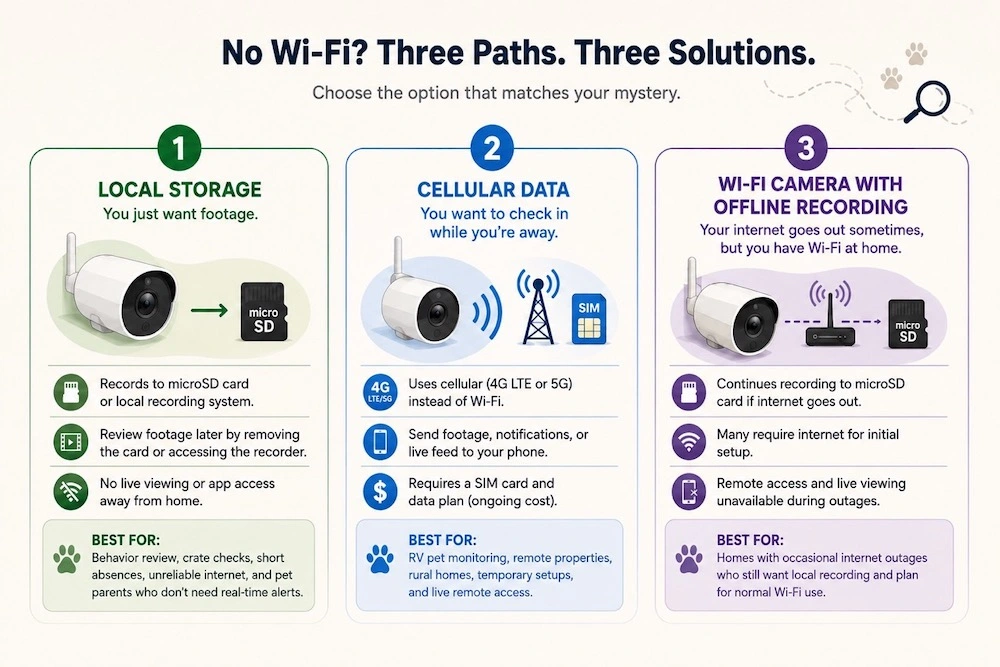
1. You do not need live viewing—you just want footage
A camera with local storage can record directly to a microSD card or a local recording system. This is often the simplest option for pet parents who want to answer questions like:
- Does my dog settle down after I leave?
- Is my cat actually using the new bed?
- What time does my puppy start fussing in the crate?
- Did my senior dog move around normally overnight?
- Is the barking coming from my pet, the neighbor’s dog, or an unusually dramatic delivery truck?
With this setup, you generally review footage later by removing the card, accessing the recorder, or connecting to the camera on a local network. You may not be able to open an app at work and watch your pet live.
Best for: behavior review, crate checks, short absences, homes with unreliable internet, and pet parents who do not need real-time alerts.
2. You want to check in while you are away
A cellular camera is the better suspect here.
Instead of connecting through home Wi-Fi, these cameras use a 4G LTE or 5G cellular network. With compatible service, a SIM card, and a data plan, they can send footage, notifications, or a live feed to your phone from locations without typical home internet—such as RVs, cabins, farms, sheds, and off-grid properties. (Reolink Store)
Best for: RV pet monitoring, remote properties, rural homes, temporary setups, and anyone who needs live remote access.
The trade-off is ongoing cost. Cellular cameras commonly require some form of mobile data plan, and the camera is only as dependable as the carrier coverage at your location.
3. Your internet goes out sometimes, but you still have Wi-Fi at home
This is a different case altogether.
Some Wi-Fi cameras can continue recording to a microSD card after losing internet access, provided local recording has been enabled. However, many still require internet during their initial setup, and you will typically lose remote access while the connection is down. (TP-Link)
That can be very useful during routine outages, but it does not mean the camera works with no Wi-Fi from the start.
Detective’s note: “No subscription,” “local storage,” “no internet,” and “no Wi-Fi” are four different clues. Treat them as separate features when comparing cameras.
Can You Use a Security Camera as a Pet Camera?
Absolutely. In many cases, a standard indoor or outdoor security camera is a very practical pet camera.
Security cameras often offer the features that matter most for checking on pets:
- Local storage options
- Wide-angle video
- Night vision
- Motion detection
- Pan-and-tilt coverage
- Battery, plug-in, or solar-power options
- Indoor and outdoor placement choices
- Two-way audio on some models
A pet-specific camera may offer extras like treat dispensing, barking alerts, activity summaries, or pet-focused app features. Those can be nice to have, but they are not essential for most no-Wi-Fi setups.
For a camera that works without home Wi-Fi, dependable recording, safe placement, and a suitable power source often matter far more than novelty features.
Which No-Wi-Fi Pet Camera Setup Is Best for You?
|
Your situation |
Best fit |
What it does well |
Main trade-off |
|
You want to review your pet’s behavior later |
Local-storage camera |
Saves footage without cloud storage |
Usually no remote live viewing |
|
You need to see your pet from work or while traveling |
Cellular camera |
Uses mobile data for remote access |
Requires coverage and a data plan |
|
Your internet drops occasionally |
Wi-Fi camera with local recording |
Can preserve footage during outages |
May still need Wi-Fi or internet for setup |
|
You are in an RV, cabin, or off-grid location |
Battery or solar cellular camera |
Flexible placement without home internet |
Battery management and data use |
|
You are checking crate behavior or short absences |
Simple microSD camera |
Affordable footage review |
You need to retrieve or access footage later |
Features That Matter Most for Offline Pet Monitoring
A camera’s marketing page may make it sound like every feature is vital. In reality, your pet-monitoring case file only needs a few essential pieces of evidence.
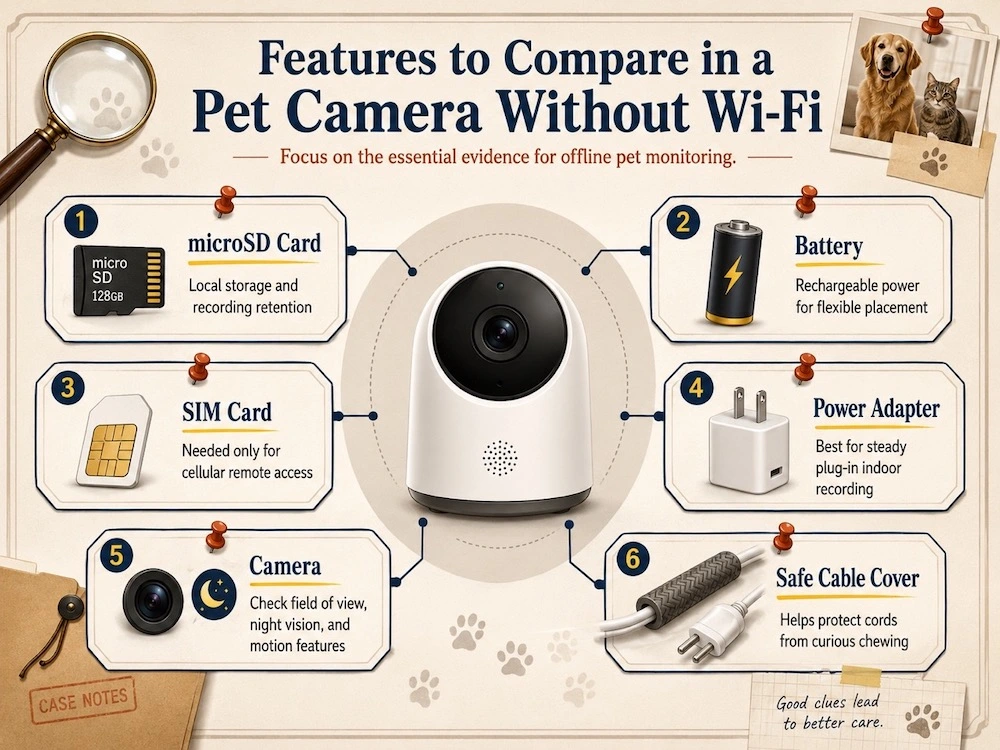
Local storage and retention time
Check exactly where footage is stored:
- MicroSD card
- Camera hub
- DVR or NVR system
- NAS or local network storage
- Internal camera storage
Then investigate how the system records.
Does it save continuously? Only when motion is detected? Does it overwrite the oldest footage when storage fills up? Can you export clips easily?
Local storage can reduce dependence on recurring cloud-storage fees, but the amount of footage you retain depends on the card or recorder capacity, video quality, and recording schedule. (Reolink Store)
Power source
Your camera cannot capture clues without power.
- Plug-in cameras are often best for steady indoor recording.
- Battery cameras offer flexibility but need recharging.
- Solar-powered cameras may be useful outdoors or off-grid, provided the panel gets enough sunlight.
- Backup power matters if your area experiences frequent outages.
For indoor pet monitoring, keep all cords, adapters, and power strips outside chewing range. A cable that looks harmless to you may look like a very exciting noodle to a bored puppy.
Field of view
For a small room, a fixed wide-angle camera may be enough. For a larger room, an open-plan space, or multiple pet zones, pan-and-tilt coverage may be more useful.
Place the camera where it can see:
- Your pet’s bed or crate
- Water access
- Main resting areas
- Doors or windows connected to problem behaviors
- Areas where accidents, chewing, barking, or pacing tend to happen
Avoid mounting it so high that your pet becomes a tiny, mysterious blur in the lower corner of the frame.
Night vision
Night vision is especially useful for:
- Overnight pet monitoring
- Early-morning departures
- Dim rooms
- Crate training
- Senior pets who may move around at night
- Outdoor monitoring in low light
Test it before you rely on it. Some night-vision footage looks crisp and clear; some makes your dog look like a fuzzy cryptid caught on a trail cam.
Motion alerts
Motion detection can help conserve storage and draw attention to activity. But it can also create false alarms from curtains, reflections, shadows, passing cars, or a cat who believes every room requires a midnight sprint.
Look for adjustable settings such as:
- Detection zones
- Sensitivity controls
- Pet, person, or general motion detection
- Alert schedules
- Clip length
For pet monitoring, motion alerts should support your routine—not turn your phone into a full-time squirrel alert system.
Two-way audio
Two-way audio can be useful in some households, but it is not automatically helpful for every pet.
Some pets may hear your voice and settle. Others may become confused, search for you, or get more frustrated because they can hear you but cannot find you. Use it thoughtfully, and do not rely on it as a replacement for appropriate care, training, or in-person support.
Privacy and account security
Whether footage stays local or passes through an app, protect your camera system.
Use a unique, strong password. Turn on two-factor authentication when the manufacturer offers it. Keep firmware updated. Review who has account access. And avoid placing cameras in highly private areas of the home.
Local storage may reduce dependence on cloud services, but it does not eliminate the need for secure accounts and sensible device settings. (TP-Link Community)
What a Fully Offline Pet Camera Cannot Do
This is where many shoppers get tripped up.
A camera with no Wi-Fi, no cellular connection, and no wired internet connection can usually record footage locally. It may also display video on a paired monitor or local system.
But it generally cannot:
- Send live alerts to your phone while you are away
- Stream video remotely over the internet
- Upload clips to a cloud account
- Let you talk to your pet from another location
- Notify you of motion outside the local setup
So, can you watch your dog from work without Wi-Fi?
Yes—but only if the camera has another way to connect, typically cellular service. A truly offline camera is better for reviewing the evidence after you return home. (Reolink Store)
Best Use Cases for Pet Cameras Without Wi-Fi
Monitoring a pet in an RV
An RV can be an excellent setting for a cellular pet camera, especially when campground Wi-Fi is unreliable or unavailable.
Look for:
- Strong carrier coverage in your planned travel areas
- A data plan with realistic video-use limits
- Battery power or safe access to consistent power
- Temperature monitoring only when you have verified how it works
- Safe mounting that will not shift while driving
- A backup plan if mobile service drops
A camera is useful for observation, but it is not a substitute for managing heat risk, ventilation, or in-person care. Never treat a remote feed as proof that a pet is safe in an unsafe temperature environment.
Rural homes, farms, and cabins
For properties outside dependable broadband coverage, cellular cameras can provide remote access without a Wi-Fi network. Local storage can also serve as a useful backup, especially when service is inconsistent. (Reolink Store)
Before buying, check:
- Carrier coverage at the exact property
- Whether the camera is compatible with your preferred network
- Weather rating for outdoor use
- Power options
- Storage capacity
- Whether the location gets enough sun for a solar panel
Internet outages
For homes that normally have Wi-Fi but experience outages, a camera with local storage may continue recording after the connection is lost. That gives you footage to review later, though remote live viewing may stop until internet service returns. (TP-Link)
Puppy crate training and alone-time checks
A simple local-recording camera can be especially helpful when you are figuring out what happens after you leave the room.
You may notice patterns such as:
- Brief fussing followed by settling
- Pacing near the crate
- Repeated chewing attempts
- Difficulty winding down
- A startling noise that triggers barking
- A nap schedule that differs wildly from the household’s official theory
Footage can help you make more informed adjustments to setup and routine. It should not be used to force a puppy to “cry it out” through escalating distress.
Possible separation-related behavior
A camera can be a useful observation tool when a dog seems distressed during absences. Behaviors linked with separation-related distress can include pacing, barking or howling, destructive chewing, indoor elimination, attempts to escape, and distress around departures. These signs can overlap with other issues, so footage alone cannot diagnose the cause. (ASPCA)
Review short clips for patterns:
- When does the behavior begin?
- Does it happen only after you leave?
- Does your dog settle eventually?
- Is the behavior focused near exits, windows, or crates?
- Are there other triggers, such as traffic noise or delivery activity?
Share useful observations with your veterinarian or a qualified behavior professional when the behavior is persistent, intense, or unsafe. The ASPCA notes that separation anxiety involves distress when a dog is separated from attachment figures, and some cases benefit from professional support. (ASPCA)
Common Buying Mistakes to Avoid
Mistake #1: Buying “no subscription” when you actually need “no Wi-Fi”
A camera can avoid monthly cloud fees and still require Wi-Fi. Read the connectivity section carefully.
Mistake #2: Assuming local storage means remote viewing
Local footage is valuable, but it does not automatically give you live access from work, the airport, or the grocery store parking lot.
Mistake #3: Skipping the cellular-coverage check
A cellular camera needs a reliable signal where it will be used. Check the carrier map for your exact location—not just your general town or nearest highway.
Mistake #4: Forgetting about power
A camera that is not charged, plugged in, or backed up during an outage is simply a very expensive shelf ornament.
Mistake #5: Ignoring setup requirements
Some cameras can record locally after setup but need internet during installation. Confirm this before ordering. (TP-Link)
Mistake #6: Choosing too narrow a view
A perfect view of one corner of the room will not help much when your pet spends the day in the other corner.
Mistake #7: Leaving cords within reach
Secure cables, adapters, and mounts. Curious pets can turn a camera setup into a chewing hazard in record time.
Mistake #8: Treating two-way audio as a care plan
Hearing your voice may not reassure every pet. For pets with severe distress, a camera should support observation and professional guidance—not replace care.
How to Set Up a No-Wi-Fi Pet Camera Safely
- Choose one behavior or area to monitor first.
Start with a crate, bed, living room, or doorway rather than trying to cover the entire house. - Place the camera at pet level or slightly above.
You want a clear view of where your pet actually spends time. - Secure power cords and accessories.
Use cord covers, elevated outlets, or protected cable routes. - Install and test local storage.
Confirm that the microSD card or recorder is recognized and that recording is enabled. - Check the footage in daylight and darkness.
Make sure your pet remains visible at night. - Test alerts before your first long absence.
Walk through the room, let your pet move around, and adjust sensitivity if needed. - Confirm your recording schedule.
Know whether your camera records continuously or only when it detects motion. - Test cellular access at the camera location.
For a cellular setup, do not assume your phone’s signal in the driveway matches the camera’s signal in the RV, barn, or back room. - Review the first few recordings.
Adjust placement, motion zones, and camera angle based on what you actually see. - Keep an in-person backup plan.
A camera can observe a problem. It cannot refill water, untangle a collar, cool an overheated room, or comfort a pet in an emergency.
The Final Verdict
Choose a local-storage camera when your main goal is to review footage later and understand what happens while you are gone.
Choose a cellular camera when you need live access, remote alerts, or a setup for an RV, farm, cabin, or home without broadband internet.
Choose a Wi-Fi camera with local recording when your real issue is occasional internet outages rather than the complete absence of Wi-Fi.
The key is matching the camera to the mystery.
Want to see whether your puppy settles in the crate? Local storage may be all you need.
Want to check on your dog while you are at work? Cellular is usually the stronger lead.
Want a backup during internet outages? Look for a camera with verified local recording.
Case solved: the best pet camera without Wi-Fi is not the flashiest gadget in the lineup. It is the one that keeps collecting useful clues when your usual connection disappears.
FAQs
Do pet cameras work without Wi-Fi?
Yes. Some cameras record locally to a microSD card, hub, DVR, NVR, or other storage device. Others use a cellular network instead of home Wi-Fi, allowing remote access through a phone app.
Can I watch my dog from work without Wi-Fi?
Yes, but the camera needs another internet connection, usually 4G LTE or 5G cellular service with a compatible data plan. A fully offline camera can record footage but normally cannot send a live feed to your phone.
Can a pet camera record without internet?
Many cameras can record to local storage without active internet after setup, but requirements vary by model. Check the manufacturer’s specifications for setup, storage, and offline-recording details before buying.
Do cellular pet cameras need a monthly fee?
They typically require a cellular data plan or prepaid data service. Some may also offer optional cloud-storage subscriptions, but the recurring cellular-data cost is the key expense to investigate.
Is a security camera okay to use as a pet camera?
Yes. A security camera can work very well as a pet camera when it has suitable storage, power, night vision, field of view, and safe placement. It may not offer pet-specific features, but those features are not necessary for many households.
Can a pet camera help with separation anxiety?
A camera can help you observe what happens when your pet is alone, including when behaviors begin and whether the pet settles. It cannot diagnose or treat separation anxiety. Contact a veterinarian or qualified behavior professional if your pet shows persistent distress, destructive behavior, escape attempts, excessive vocalization, or elimination when left alone. (ASPCA)

Become a Junior Pet Detective
Get weekly pet mysteries, behavior clues, recall alerts, and detective-approved recommendations sent straight to your inbox.